

Gravity Forms – Bizappay Payment Integration Plugin
RM200.00
Accept payments directly through Bizappay (FPX, e-wallet, bank transfer) when customers submit your Gravity Forms. Built for businesses, service providers, booking platforms and event organisers who want a simple, secure payment solution without leaving their WordPress site.
One-time purchase: no subscription fees, just a single payment with limited plugin support included.
Key Features
- Seamless Gravity Forms Integration — Collect payments automatically when forms with a total amount are submitted, with no extra steps or third-party redirects within your control.
- Multiple Payment Methods — Accept FPX, e-wallets (Boost, GCash, Touch ‘n Go), bank transfers and more through Bizappay’s hosted payment gateway.
- Form Total Billing — Automatically charge the sum of all pricing fields in your form (products, options, shipping, discounts). No manual amount entry needed.
- Automatic Status Tracking — Entry payment status updates in real-time. Track paid, pending, and failed payments directly in Gravity Forms.
- Flexible Payment Mapping — Map customer name, email and phone fields from your form to Bizappay’s payment details.
- Conditional Logic Support — Enable payment collection only for specific form submissions using Gravity Forms’ built-in conditional logic.
- Live & Sandbox Mode — Test your integration risk-free in sandbox mode before going live.
- One-off Payment — Buy once, own it forever. No hidden renewal fees or mandatory support contracts.
How to Get Your Bizappay Credentials
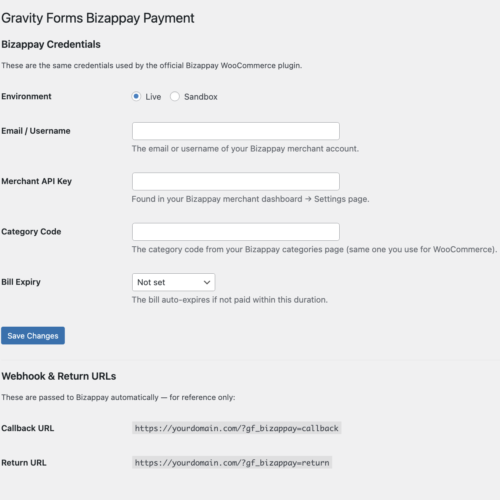
This plugin requires a valid Bizappay merchant account. You’ll need three pieces of information:
- Merchant Email / Username — The email or username you use to log into your Bizappay merchant dashboard.
- Merchant API Key — Found in your Bizappay merchant dashboard under Settings → Profile.
- Category Code — The category code from your Bizappay account. (This is the same code you use if you have the Bizappay WooCommerce plugin installed.)
To get started:
- Sign up for a Bizappay merchant account at https://bizappay.my (or sandbox at https://stg.bizappay.my for testing).
- Log in to your merchant dashboard and navigate to Settings → Profile to copy your API key.
- Go to Categories to find your category code.
- Install this plugin, then add these credentials under WordPress Admin → Settings → GF Bizappay.
Note: We are not officially affiliated with Bizappay. For merchant account questions, API key issues, or payment-related support, please reach out to Bizappay directly at their support channels.
Benefits for Your Business
- Increase Revenue — Accept payments online from customers who prefer FPX and local e-wallet methods. No extra friction in the checkout flow.
- Save Time — Automate payment collection and entry status updates. Staff no longer needs to manually track who paid and who didn’t.
- Better Security — Payments are processed by Bizappay’s PCI-compliant hosted gateway, so sensitive card and wallet data never touches your website.
- Improve Customer Experience — Customers stay in their comfort zone using familiar local payment methods (FPX, Boost, etc.). No surprises or unfamiliar gateways.
- Unified Payment Dashboard — See all Bizappay transactions in one place on your Bizappay merchant account, then cross-reference them with entry data in Gravity Forms.
Perfect For
- Event Organisers — Collect registration fees and ticketing payments directly from your booking forms.
- Service Providers — Consultants, coaches, trainers can collect deposits or full payment at the point of service request.
- Booking Platforms — Hotels, resorts, and activity providers can process reservation payments instantly.
- Donation & Fundraising — Collect donations or sponsorships through weighted or variable-amount forms.
- Course & Training Sign-ups — Education providers can charge enrollment fees when students submit registration forms.
- B2B & Corporate — Invoicing, quotes, and purchase order forms can include immediate payment collection.
How It Works
- Create Your Form — Build a Gravity Form with a pricing field (Product, Total, or Option field) that adds up to a total amount.
- Add Bizappay Feed — In your form settings, go to Bizappay and create a new feed. Map customer name/email/phone fields.
- Customer Submits — When a customer fills and submits the form, they’re automatically redirected to Bizappay to pay the form’s total amount.
- Payment Processed — After payment, they’re redirected back to your site and the form entry is marked as Paid automatically.
- You’re Notified — Entry status updates in real-time. Use Gravity Forms notifications to email the customer a receipt and yourself a summary.
Support & Disclaimer
Plugin Support: Limited email support is included for installation, setup, and configuration questions related to the Gravity Forms Bizappay plugin.
Important: We are not affiliated with Bizappay. We cannot assist with Bizappay merchant account setup, payment processing issues, or API key requests. Please contact Bizappay support directly for those enquiries.
For plugin-related questions (installation, form mapping, payment feed configuration, bugs), you may email us at info@kodedigital.expert and we’ll be happy to help.
Requirements
- WordPress
- Gravity Forms subscription
- An active Bizappay merchant account
- SSL certificate on your website (required for Bizappay payments)
Ready to Automate Payments on Your Forms?
Stop chasing customers for payment. Collect money automatically when they submit your Gravity Forms. Get started with Gravity Forms Bizappay Payment Integration today.
One-time purchase. No subscriptions. No limits.


